GitHub Integration
How Treq connects workspaces to GitHub pull requests, CI checks, and review threads.
Treq's GitHub integration links each workspace branch to its remote pull request. You create and open PRs from the workspace, watch CI in the header, and read GitHub review threads on the Review tab.
The integration has two layers. Day-to-day PR and CI actions use the local GitHub CLI (gh) with your GitHub credentials. Repository linking uses the Treq GitHub App through your Treq account. See Connecting GitHub.
Prerequisites
Treq shows GitHub controls only when the repository's origin remote points at github.com. Other hosts stay on plain Git push and pull.
| Capability | Auth path |
|---|---|
| Create, view, and comment on PRs and issues | Local gh |
| CI status in the workspace header and PR detail | Local gh |
| Inline GitHub review threads on the Review tab | Local gh |
Pull Requests
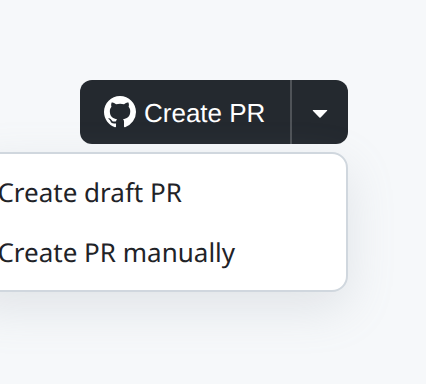
When a workspace has commits and no open PR yet, the workspace header shows Create PR. The primary action pushes the branch if needed, then creates the PR. The dropdown adds Create draft PR and Create PR manually, which opens GitHub's compare page after a push.
Treq derives a conventional-commit title from the workspace title or branch name when it creates the PR.
View PR opens the in-app GitHub panel on that pull request. A secondary control opens the same PR in the browser. The sidebar context menu can copy the PR URL when Treq already knows it.
The Review tab Commit control can Commit and create PR or Commit and push in one step. Those actions share creation state with the header button, so an in-flight create shows as pending on both surfaces.
For the full create and view flow, see Creating and Viewing Pull Requests.
GitHub Panel
Open GitHub in the workspace sidebar to reach Issues and Pull Requests. The panel uses hash routes such as #/github/prs/open so the ?repo= query stays intact.
Pull Requests and Issues use a dual-pane list and detail layout. Issue filters are Open, Closed, and All. Pull Request filters add Draft to the left of Open, and Draft lists only draft PRs. From a PR you can read the body and conversation, add a comment, mark draft or ready, close or reopen, and open the PR on GitHub. The list also has a New form for creating a PR by hand with title, body, base, and head.
CI Checks
Treq only displays active GitHub checks, and does not merge the PR automatically once the checks pass.
Review Threads
When a workspace has an open PR, the Review tab loads GitHub review comment threads and loads them inline for referencing during the code review.
You can quote a GitHub thread into a local pending review comment for an agent. Quoting does not post back to GitHub. Local review comments can be copied to clipboard or sent to an agent terminal.
Availability
| Features | Free | Pro |
|---|---|---|
| Issues | ✅* | ✅ |
| Pull Requests | ✅* | ✅ |
* Requires gh CLI